Requesting Full Adolescent Proxy Access
In compliance with state and federal laws, there are special considerations for granting proxy access to an adolescent (age 12 to 17 years + 364 days) patient’s MyChart account. Adolescent patients have the right to limit what medical information they share via MyChart. These instructions pertain to requesting Full Adolescent Proxy access, which requires the adolescent patient’s consent.
For information about Adolescent Proxy Access, review Requesting Proxy Access to an Adolescent’s MyChart Account
If you are looking for a different type of access, review Accessing MyChart
Follow these steps to request Full Adolescent Proxy Access to your adolescent’s MyChart account. This process requires both the proxy and the adolescent patient to be completed successfully. Each step will identify who should be completing it.
 Carum Family Scenario: In the following scenario, Frank Carum will be our proxy, and Jimmy Carum will be our adolescent patient.
Frank Carum (Age 34) is the father and legal guardian of Jimmy Carum (Age 14). Since Jimmy falls within the age range of 12 to 17 years + 364 days, Frank must submit a Full Proxy Request in order to gain full access to Jimmy’s MyChart account. Frank follows the directions below and is able to gain access!
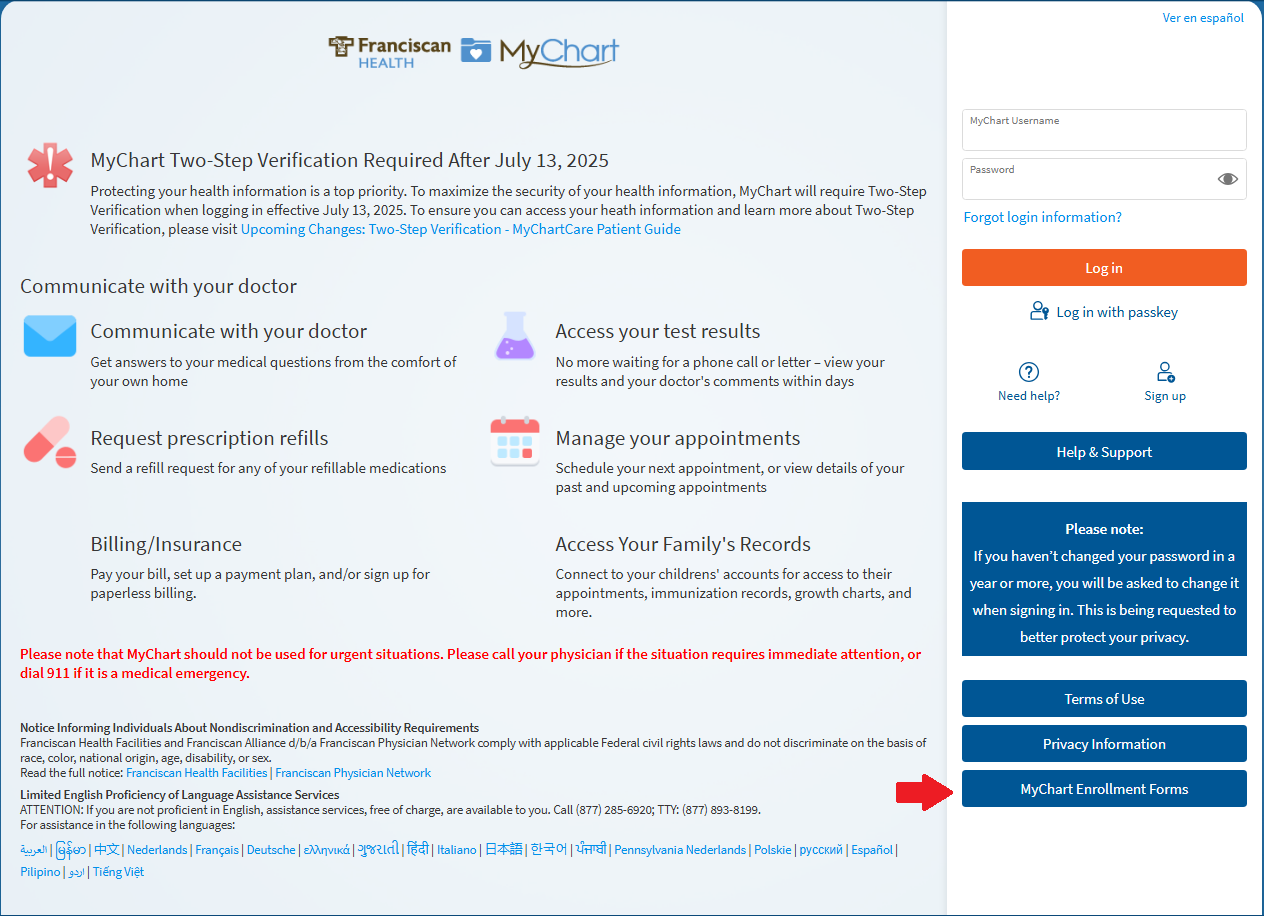
Frank starts by going to the login page for his partner healthcare organization and locating “MyChart Enrollment Forms”. As there are many different forms, Frank is sure to select the link for the “Request Full Proxy Access to an Adolescent’s MyChart Information” as this is the request form to gain full access for adolescents ages 12 to 17 years + 364 days.
Frank first enters his own information, then under the section that says “Proxy Access to MyChart Records” he inputs Jimmy’s information. He is then sure to double check his information and add his own signature and clicks “Submit Form”.
After the form is manually reviewed, Jimmy will receive an email asking for his consent. Note that for full access of an adolescent’s MyChart account, the adolescent must consent.
Jimmy will then complete the form in this email by entering his own information in the first section and Frank’s (the proxy) information in the next section.
Jimmy will then double check all the information that he has provided and click “Submit Form”. Allowing the forum to be manually reviewed.
Now the process is done! Frank and Jimmy’s form was reviewed and accepted, allowing Frank to now have full access to Jimmy’s MyChart account.
NOTE: You will need your own MyChart account to complete this process. If you do not have an active MyChart account, review Setting Up a MyChart Login for Yourself (Adult)
-
PROXY: Go to the login page for your partner healthcare organization.
-
PROXY: Click on "MyChart Enrollment Forms"
-
PROXY: In the MyChart Proxy Enrollment section, select the link for "Request Full Proxy Access to an Adolescent's MyChart Information."
There are several forms here for different types of proxy request. Be sure to select the appropriate form link.

-
PROXY: Enter your personal information as the proxy.
This is YOUR information that is to be entered, not the patient’s.

-
PROXY: Enter the patient's information in the patient's fields.
This is the PATIENT’s information, not yours.

-
PROXY: Review the terms and sign the form.
This is your signature as the proxy, not the patient. The patient does not sign this form since their consent is not required for Limited Adolescent Proxy Access.

-
PROXY: Click "Submit Form" and await manual review.
MyChart Support Center staff will review the form to ensure the information is complete and accurate. The MyChart Support Center will contact the patient and parent/guardian to complete the process. The adolescent patient will need to complete the next steps.
-
PATIENT: Check email for MyChart Proxy Consent link.
The MyChart Support Center will send a consent form to the adolescent patient to complete.
-
PATIENT: Complete "MyChart Record Parent/Guardian Proxy Release of Information Authorization"
Complete the form by entered the PATIENT’s information in the top section and the proxy’s information in the next section.
-
PATIENT: Review terms and sign electronically.

-
Click "Submit Form" and await manual review.
MyChart Support Center staff will review the form to ensure the information is complete and accurate. The MyChart Support Center will contact the patient and parent/guardian to complete the process.
In compliance with state and federal laws, there are special considerations for granting proxy access to an adolescent (age 12 to 17 years + 364 days) patient’s MyChart account. Adolescent patients have the right to limit what medical information they share via MyChart. These instructions pertain to requesting Full Adolescent Proxy access, which requires the adolescent patient’s consent.
For information about Adolescent Proxy Access, review Requesting Proxy Access to an Adolescent’s MyChart Account
If you are looking for a different type of access, review Accessing MyChart
Follow these steps to request Full Adolescent Proxy Access to your adolescent’s MyChart account. This process requires both the proxy and the adolescent patient to be completed successfully. Each step will identify who should be completing it.
Carum Family Scenario: In the following scenario, Frank Carum will be our proxy, and Jimmy Carum will be our adolescent patient.
Frank Carum (Age 34) is the father and legal guardian of Jimmy Carum (Age 14). Since Jimmy falls within the age range of 12 to 17 years + 364 days, Frank must submit a Full Proxy Request in order to gain full access to Jimmy’s MyChart account. Frank follows the directions below and is able to gain access!
Frank starts by going to the login page for his partner healthcare organization and locating “MyChart Enrollment Forms”. As there are many different forms, Frank is sure to select the link for the “Request Full Proxy Access to an Adolescent’s MyChart Information” as this is the request form to gain full access for adolescents ages 12 to 17 years + 364 days.
Frank first enters his own information, then under the section that says “Proxy Access to MyChart Records” he inputs Jimmy’s information. He is then sure to double check his information and add his own signature and clicks “Submit Form”.
After the form is manually reviewed, Jimmy will receive an email asking for his consent. Note that for full access of an adolescent’s MyChart account, the adolescent must consent.
Jimmy will then complete the form in this email by entering his own information in the first section and Frank’s (the proxy) information in the next section.
Jimmy will then double check all the information that he has provided and click “Submit Form”. Allowing the forum to be manually reviewed.
Now the process is done! Frank and Jimmy’s form was reviewed and accepted, allowing Frank to now have full access to Jimmy’s MyChart account.
NOTE: You will need your own MyChart account to complete this process. If you do not have an active MyChart account, review Setting Up a MyChart Login for Yourself (Adult)
-
PROXY: Go to the login page for your partner healthcare organization.
-
PROXY: Click on "MyChart Enrollment Forms"
-
PROXY: In the MyChart Proxy Enrollment section, select the link for "Request Full Proxy Access to an Adolescent's MyChart Information."
There are several forms here for different types of proxy request. Be sure to select the appropriate form link.
-
PROXY: Enter your personal information as the proxy.
This is YOUR information that is to be entered, not the patient’s.
-
PROXY: Enter the patient's information in the patient's fields.
This is the PATIENT’s information, not yours.
-
PROXY: Review the terms and sign the form.
This is your signature as the proxy, not the patient. The patient does not sign this form since their consent is not required for Limited Adolescent Proxy Access.
-
PROXY: Click "Submit Form" and await manual review.
MyChart Support Center staff will review the form to ensure the information is complete and accurate. The MyChart Support Center will contact the patient and parent/guardian to complete the process. The adolescent patient will need to complete the next steps.
-
PATIENT: Check email for MyChart Proxy Consent link.
The MyChart Support Center will send a consent form to the adolescent patient to complete.
-
PATIENT: Complete "MyChart Record Parent/Guardian Proxy Release of Information Authorization"
Complete the form by entered the PATIENT’s information in the top section and the proxy’s information in the next section.
-
PATIENT: Review terms and sign electronically.
-
Click "Submit Form" and await manual review.
MyChart Support Center staff will review the form to ensure the information is complete and accurate. The MyChart Support Center will contact the patient and parent/guardian to complete the process.