
Request MyChart Login for Adolescent Patients
This topic provides instructions for requesting access to MyChart for an adolescent patient (age 12 to 17 years + 364 days).
If you are looking for a different type of access, review Accessing MyChart
These steps should only be used for requesting access to MyChart for an adolescent patient (age 12 to 17 years + 364 days). This process requires a manual review before adolescent access is granted.
 Carum Family Scenario: In this scenario, Jimmy Carum will be the adolescent patient, and Frank Carum will be his parent/legal guardian.
Jimmy Carum (Age 14) needs to request access to MyChart account. Since Jimmy falls within the age range of 12 to 17 years + 364 days, Jimmy can use the following steps to request access to his MyChart account. Of course, Frank Carum, will be there to help Jimmy through the process!
Jimmy starts by going to the login page for his partner healthcare organization.
He then clicks “MyChart Enrollment Forms” and selects the link labeled “Request Adolescent Patient MyChart Access“.
Jimmy will then enter his own personal information into the form. Both Jimmy and Frank will electronically sign this form.
Jimmy then clicks “Submit Form” and awaits a manual review.
Now the process is done!
NOTE: This is NOT for parent/guardian login. The username and password created by this process is intended only for the use of the adolescent patient.
-
Go to the login page for your partner healthcare organization.
-
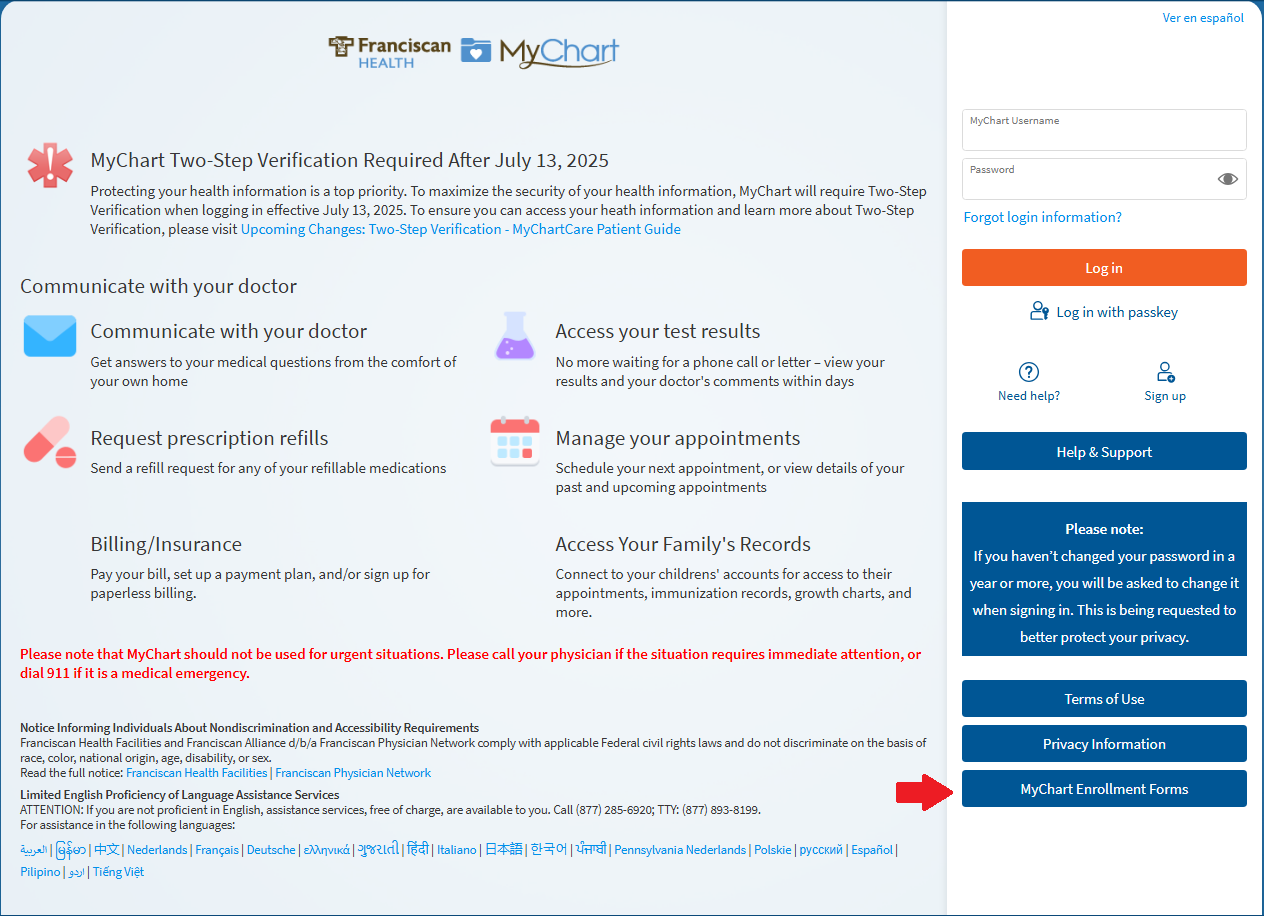
Click on "MyChart Enrollment Forms"
-
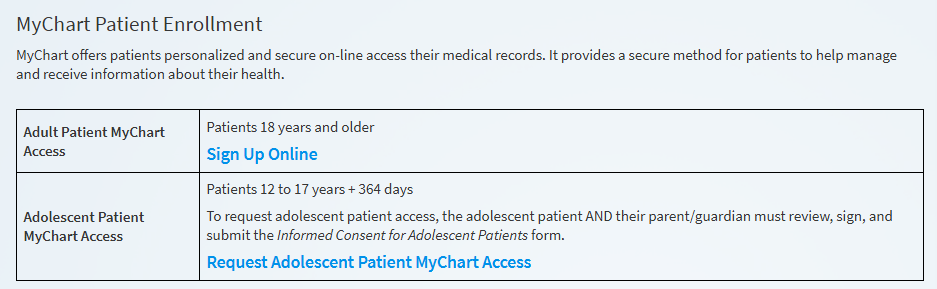
Select the link for "Request Adolescent Patient MyChart Access"
-
Enter the personal information for the adolescent patient.

-
Have the adolescent and parent/guardian electronically sign the forms.

-
Click "Submit Form" and await manual review.
MyChart Support Center staff will review the form to ensure the information is complete and accurate. The MyChart Support Center will contact the patient and parent/guardian to complete the process.
This topic provides instructions for requesting access to MyChart for an adolescent patient (age 12 to 17 years + 364 days).
If you are looking for a different type of access, review Accessing MyChart
These steps should only be used for requesting access to MyChart for an adolescent patient (age 12 to 17 years + 364 days). This process requires a manual review before adolescent access is granted.
Carum Family Scenario: In this scenario, Jimmy Carum will be the adolescent patient, and Frank Carum will be his parent/legal guardian.
Jimmy Carum (Age 14) needs to request access to MyChart account. Since Jimmy falls within the age range of 12 to 17 years + 364 days, Jimmy can use the following steps to request access to his MyChart account. Of course, Frank Carum, will be there to help Jimmy through the process!
Jimmy starts by going to the login page for his partner healthcare organization.
He then clicks “MyChart Enrollment Forms” and selects the link labeled “Request Adolescent Patient MyChart Access“.
Jimmy will then enter his own personal information into the form. Both Jimmy and Frank will electronically sign this form.
Jimmy then clicks “Submit Form” and awaits a manual review.
Now the process is done!
NOTE: This is NOT for parent/guardian login. The username and password created by this process is intended only for the use of the adolescent patient.
-
Go to the login page for your partner healthcare organization.
-
Click on "MyChart Enrollment Forms"
-
Select the link for "Request Adolescent Patient MyChart Access"
-
Enter the personal information for the adolescent patient.
-
Have the adolescent and parent/guardian electronically sign the forms.
-
Click "Submit Form" and await manual review.
MyChart Support Center staff will review the form to ensure the information is complete and accurate. The MyChart Support Center will contact the patient and parent/guardian to complete the process.