Starting on July 12th, 2026, MyChart will be going through an upgrade. With this upgrade will come a few changes to the MyChart application. These changes include the following:
 Meet the Carum family!
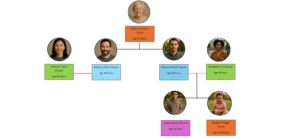
The following fictional family was created by Franciscan Alliance to help explain different ways in which families can use MyChart together. First, let’s do some introductions.

Clare “Cee Cee” Carum, Age 72 Years
At the top you will see Clare or “Cee Cee” Carum, age 72. Cee Cee is the mother of Francis “Frank” and Anthony “Tony”. Recently, Cee Cee has had trouble making decisions on her own, so, through the Requesting Proxy Access to a MyChart account for Someone that is Not Capable of Making Decisions, Topic Article on MyChart, Cee Cee has allowed Tony proxy access to her MyChart account.

Anthony “Tony” Carum, Age 44 Years

Theresia “Terry” Carum, Age 45 Years
Now let’s meet Anthony “Tony” and Theresia “Terry” Carum. Terry and Tony are married and, using the MyChart Topic article, Send an Invite to an Adult Proxy, to allow Terry to have proxy access to Tony’s MyChart accounts.

Francis “Frank” Carum, Age 35 Years

Elizabeth “Liz” Carum, Age 34 Years
Next is Francis “Frank” and his wife Elizabeth “Liz”. Frank and Liz are married and have two adorable kids, James “Jimmy” and Margaret “Peggy”.

Margaret “Peggy” Carum, Age 12 Months
Since Peggy is only 12 months, Liz and Frank will obviously need access to Peggy’s MyChart account. They can do this by following the directions in the Topic article entitled, Requesting Proxy Access to a Child’s MyChart Account.

James “Jimmy” Carum, Age 14 Years
Jimmy is 14 years old. Since he falls within the age range of 12 to 17 years + 364 days, that means Frank and Liz gaining access to his MyChart account is different than that of his little sister Peggy’s. But, not to worry! They can follow the directions in the Request MyChart Login for Adolescent Patients to gain proxy access to Jimmy’s MyChart account as his legal guardians.
All together the Carum’s make one big happy family! We have added examples using the Carum family to several of our accesses and account articles to help you better understand how these processes work! If you ever need a refresher on their family tree you can always reference this article.
Now you be asking, how was the Carum family created? Well, their last name “Carum” can be translated in Latin to “one who receives care”. The first names are taken from the saint’s whose names were previously used at Franciscan hospitals, with one exception to honor the founder of the SSFPA.
With MyChart access, you can manage care for you and your loved ones. Here is how to set up access.
NOTE: This topic is focused on how to set up a MyChart account and access your health information. For instructions on how to log in once you have an account, please review Log Into MyChart.
There are several methods by which you can access MyChart for yourself or others you care for. Because MyChart provides access to protected health information, we have specific processes and safeguards in place to ensure access is appropriately granted in compliance with state and federal laws.
MyChart login access is available to eligible patients served by Franciscan Health or our partners. To be eligible for your own MyChart login, you must meet at least one of the following conditions:
Children (age 11 and younger) cannot log into MyChart. However, a parent/guardian can be granted proxy access to the child’s MyChart account as outlined below.
Adults (age 18 and older) can be granted access to another patient’s MyChart account. This is known as Proxy Access. The way this is done depends on the patient’s age and capacity to make their own medical decisions.
Carum Family Scenario: In this scenario, Terry Carum will be our proxy and Cee Cee Carum will be our patient.
Terry Carum is Cee Cee Carum’s daughter-in-law. Since Cee Cee is no longer capable of making decisions for herself, Terry has decided to request proxy access to Cee Cee’s MyChart account.
Due to the important nature for this type of proxy request, Terry is not able to submit an electronic request to become proxy to Cee Cee’s MyChart account.
To request proxy access for Cee Cee’s account, Terry calls the MyChart Support Center using the following number, 1-877-900-5741 to discuss what documentation is needed from Cee Cee and Terry to grant Terry proxy access.
When someone is not capable of making their own decisions regarding their healthcare or access to protected health information, special care is needed to ensure that access to their MyChart account as a proxy is appropriate and supported with the proper legal documentation. For this reason, we currently do not allow requests to be submitted electronically for this type of proxy access.
To get proxy access as a caregiver of someone meeting these criteria, please call the MyChart Support Center at 1-877-900-5741 to discuss what documentation is needed based on your situation.
If you are looking for a different type of access, review Accessing MyChart
Learn MoreIn compliance with state and federal laws, there are special considerations for granting proxy access to an adolescent (age 12 to 17 years + 364 days) patient’s MyChart account. Adolescent patients have the right to limit what medical information they share via MyChart. These instructions pertain to requesting Full Adolescent Proxy access, which requires the adolescent patient’s consent.
For information about Adolescent Proxy Access, review Requesting Proxy Access to an Adolescent’s MyChart Account
If you are looking for a different type of access, review Accessing MyChart
Learn MoreIn compliance with state and federal laws, there are special considerations for granting proxy access to an adolescent (age 12 to 17 years + 364 days) patient’s MyChart account. Adolescent patients have the right to limit what medical information they share via MyChart. These instructions pertain to requesting Limited Adolescent Proxy access, which does NOT require the adolescent patient’s consent.
For information about Adolescent Proxy Access, review Requesting Proxy Access to an Adolescent’s MyChart Account
If you are looking for a different type of access, review Accessing MyChart
Learn MoreIn compliance with state and federal laws, there are special considerations for granting proxy access to an adolescent (age 12 to 17 years + 364 days) patient’s MyChart account. Adolescent patients have the right to limit what medical information they share via MyChart. For this reason, there are two types of adolescent proxy access.
Limited Adolescent Proxy Access
A parent/guardian can be granted Limited Adolescent Proxy Access WITHOUT the adolescent patient’s consent. Limit Adolescent Proxy Access is automatically applied to parent/guardians that have been a proxy for their child prior to reaching age 12. Limited Adolescent Proxy Access grants the parent/guardian specific access to key information and features. This includes the ability to view some vaccination records, schedule appointments, and pay bills.
If you have never been a proxy for your child that is now an adolescent, you can review Requesting Limited Adolescent Proxy Access
A parent/guardian can be granted Full Adolescent Proxy Access with consent of the adolescent patient. Full Adolescent Proxy Access enables access to all information and features available. More information on requesting full proxy access can be found by reviewing Requesting Full Adolescent Proxy Access
Learn MoreParents/guardians can be granted proxy access their child’s (age 11 and younger) MyChart account. Proxy access allows the parent/guardian to review the child’s medical history, manage appointments, message the child’s provider, and much more.
NOTE: When a child reaches the age of 12, proxy access for the parent/guardian is automatically changed to Limited Adolescent Proxy Access.
NOTE: If you are a mother who delivered your newborn at a Franciscan facility after May 14, 2024, you may already have proxy access granted through Automatic Newborn Proxy setup.
If you are looking for a different type of access, review Accessing MyChart
Learn MoreThis topic provides instructions for requesting access to MyChart for an adolescent patient (age 12 to 17 years + 364 days).
If you are looking for a different type of access, review Accessing MyChart
Learn MoreIf you are an adult (age 18 or older) with a MyChart account, you can invite another adult to be a proxy. The proxy will be able to see the same information you see in your MyChart account and can perform tasks on your behalf, such as scheduling appointments and messaging with your providers.
Adolescents (age 12 to 17 years + 364 days) and Children (age 11 and younger) cannot use this process to invite others. For more information on proxy access, review Accessing MyChart
Learn MoreIf someone has invited you to have proxy access to their MyChart account, you will receive an email with guidance on how to accept.
NOTE: You will need your own MyChart account to complete this process. If you do not have an active MyChart account, review Setting Up a MyChart Login for Yourself (Adult)
Learn MoreTo revoke access to your MyChart, log into MyChart and from the left menu, go to the My Family’s Records section and select Family Access Settings. Finally, select the name of the proxy you no longer want to have access and click the revoke access button.
No, due to the sensitive nature of medical information, each adult must establish their own MyChart account. You may request proxy access to each other’s record, but you will need to log in to your own account to view either your own record or your spouse’s record.
Go to Accessing MyChart for more information on proxy access.
Yes, if you are signed up as a proxy for that family member. Click on the icon for the family member you want to ask a question about. You will then be able to view that person’s medical information and can send the question to the appropriate provider. It is very important to access your family member’s account because any communication with your provider from your account will be placed in your health record. This information would not appear in the correct health record and could potentially jeopardize medical care.
Yes, you can. This is called proxy access and allows you (as a proxy) to log in to your personal MyChart account and then connect to information regarding your family member.
Go to Accessing MyChart for more information on proxy access.