
 Meet the Carum family!
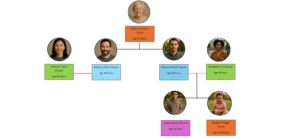
The following fictional family was created by Franciscan Alliance to help explain different ways in which families can use MyChart together. First, let’s do some introductions.

Clare “Cee Cee” Carum, Age 72 Years
At the top you will see Clare or “Cee Cee” Carum, age 72. Cee Cee is the mother of Francis “Frank” and Anthony “Tony”. Recently, Cee Cee has had trouble making decisions on her own, so, through the Requesting Proxy Access to a MyChart account for Someone that is Not Capable of Making Decisions, Topic Article on MyChart, Cee Cee has allowed Tony proxy access to her MyChart account.

Anthony “Tony” Carum, Age 44 Years

Theresia “Terry” Carum, Age 45 Years
Now let’s meet Anthony “Tony” and Theresia “Terry” Carum. Terry and Tony are married and, using the MyChart Topic article, Send an Invite to an Adult Proxy, to allow Terry to have proxy access to Tony’s MyChart accounts.

Francis “Frank” Carum, Age 35 Years

Elizabeth “Liz” Carum, Age 34 Years
Next is Francis “Frank” and his wife Elizabeth “Liz”. Frank and Liz are married and have two adorable kids, James “Jimmy” and Margaret “Peggy”.

Margaret “Peggy” Carum, Age 12 Months
Since Peggy is only 12 months, Liz and Frank will obviously need access to Peggy’s MyChart account. They can do this by following the directions in the Topic article entitled, Requesting Proxy Access to a Child’s MyChart Account.

James “Jimmy” Carum, Age 14 Years
Jimmy is 14 years old. Since he falls within the age range of 12 to 17 years + 364 days, that means Frank and Liz gaining access to his MyChart account is different than that of his little sister Peggy’s. But, not to worry! They can follow the directions in the Request MyChart Login for Adolescent Patients to gain proxy access to Jimmy’s MyChart account as his legal guardians.
All together the Carum’s make one big happy family! We have added examples using the Carum family to several of our accesses and account articles to help you better understand how these processes work! If you ever need a refresher on their family tree you can always reference this article.
Now you be asking, how was the Carum family created? Well, their last name “Carum” can be translated in Latin to “one who receives care”. The first names are taken from the saint’s whose names were previously used at Franciscan hospitals, with one exception to honor the founder of the SSFPA.
You can self-schedule certain appointments with your established Care Team via MyChart.
NOTE: Not all providers or services participate in online scheduling. If you do not see the option to schedule or manage your appointments, please contact the office or department directly.
Learn MoreYou can Cancel and Reschedule certain appointments in MyChart.
Note: For certain appointments you cannot reschedule or cancel online. This is typically because the appointment is time-sensitive and requires coordination with your care team before rescheduling or cancelling. Please be sure to contact your care provider if you have questions about an appointment.
Learn MoreMyChart offers tools to help you manage your scheduled appointments.
NOTE: Not all providers or services participate in online scheduling. If you do not see the option to schedule or manage your appointments, please contact the office or department directly.
MyChart allows you to schedule with your care team if you are an established patient. See the topic: Scheduling an Appointment in MyChart
Within MyChart, you can find a list of all of your appointments. To reschedule or cancel, see the topic: Reschedule and Cancel Appointments in MyChart
Learn More